The primary use of Vector Search is to calculate the distances of embeddings/vectors, i.e., identify a new object using the classification of the other objects.
In the previous post , we used the example of fruits to create vectors. In this post, we’ll use these fruits to identify new fruits based on their properties. The properties we’re working is Sweetness and Color. Based on these properties, we can identify fruits with only 2 properties. This is extremely imprecise, but it’s only a simple example; in real cases, the difference is the quantity of vector dimensions/properties.
| Fruit (Object) | Sweetness | Color |
|---|---|---|
| Apple | 0.7 | 0.9 |
| Banana | 0.8 | 0.1 |
| Watermelon | 0.9 | 0.2 |
In this table, we have 3 examples of fruits already categorized manually; this is our dataset. Now let’s go identify the X Fruit. The sweetness of this fruit is 0.5, and your color is 0.7 (remembering that color = 0 is green, and color = 1 is red). As we have 2 dimensions, we can use a Cartesian plane to visualize this.
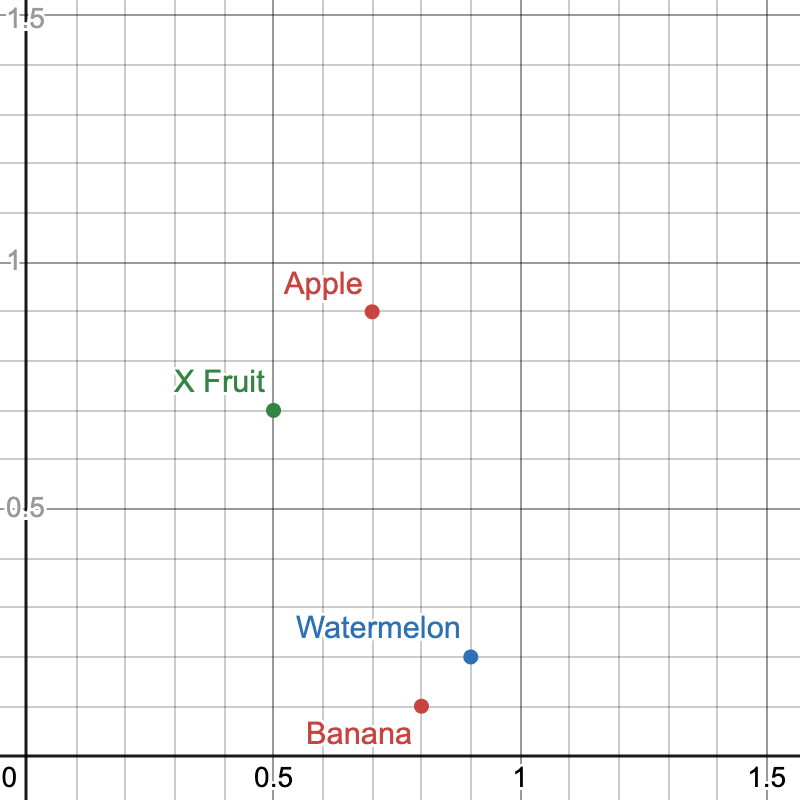
Visualizing this Cartesian Plane, we can observe that the X Fruit is an Apple, because its distance to the Apple is less than the other fruits. The Vector Search is basically this. In this example, we identified the type of X Fruit manually, but there are a lot of Algorithms to make this more efficient.
For example, we could use the Nearest Neighbor with the Euclidean Distance of these Vectors:
<?php

declare(strict_types=1);

final class FruitVector
{
    public function __construct(
        public readonly float $sweetness,
        public readonly float $color
    )
    {
    }

    public function calculateEuclideanDistance(FruitVector $fruitVector): float
    {
        return sqrt(
            pow($fruitVector->sweetness - $this->sweetness, 2) + pow($fruitVector->color - $this->color, 2)
        );
    }
}

$fruits = [
    'apple' => new FruitVector(0.7, 0.9),
    'banana' => new FruitVector(0.8, 0.1),
    'watermelon' => new FruitVector(0.9, 0.2)
];

$newFruitToIdentifyType = new FruitVector(0.5, 0.7); # The X Fruit
$distances = array_map(
    fn (FruitVector $item, string $type) => [
        'type' => $type,
        'distance' => $newFruitToIdentifyType->calculateEuclideanDistance($item)
    ],
    $fruits,
    array_keys($fruits)
);

usort($distances, fn ($a, $b) => $a['distance'] <=> $b['distance']);
print_r($distances[0]);

// Output:
// Array
// (
//     [type] => apple
//     [distance] => 0.28284271247462
// )
Note: I’m not an expert on this subject, I’m just sharing my findings. I encourage you to comment below if you identify any incorrect information or wish to share something.